



AI Note Taker | No Meeting Bots

Stay in the conversation — let AI write the meeting notes

Memo AI is a bot-free AI note taker and AI meeting assistant for Zoom, Google Meet, and Teams. Record calls from your desktop or browser and get summaries, decisions, and action items in minutes.

50 free minutes every month | Unlimited meetings on Pro

  • 200,000+ users
  • No bots in calls
  • 99 languages
  • 6 AI report formats
  • Audio deleted after processing
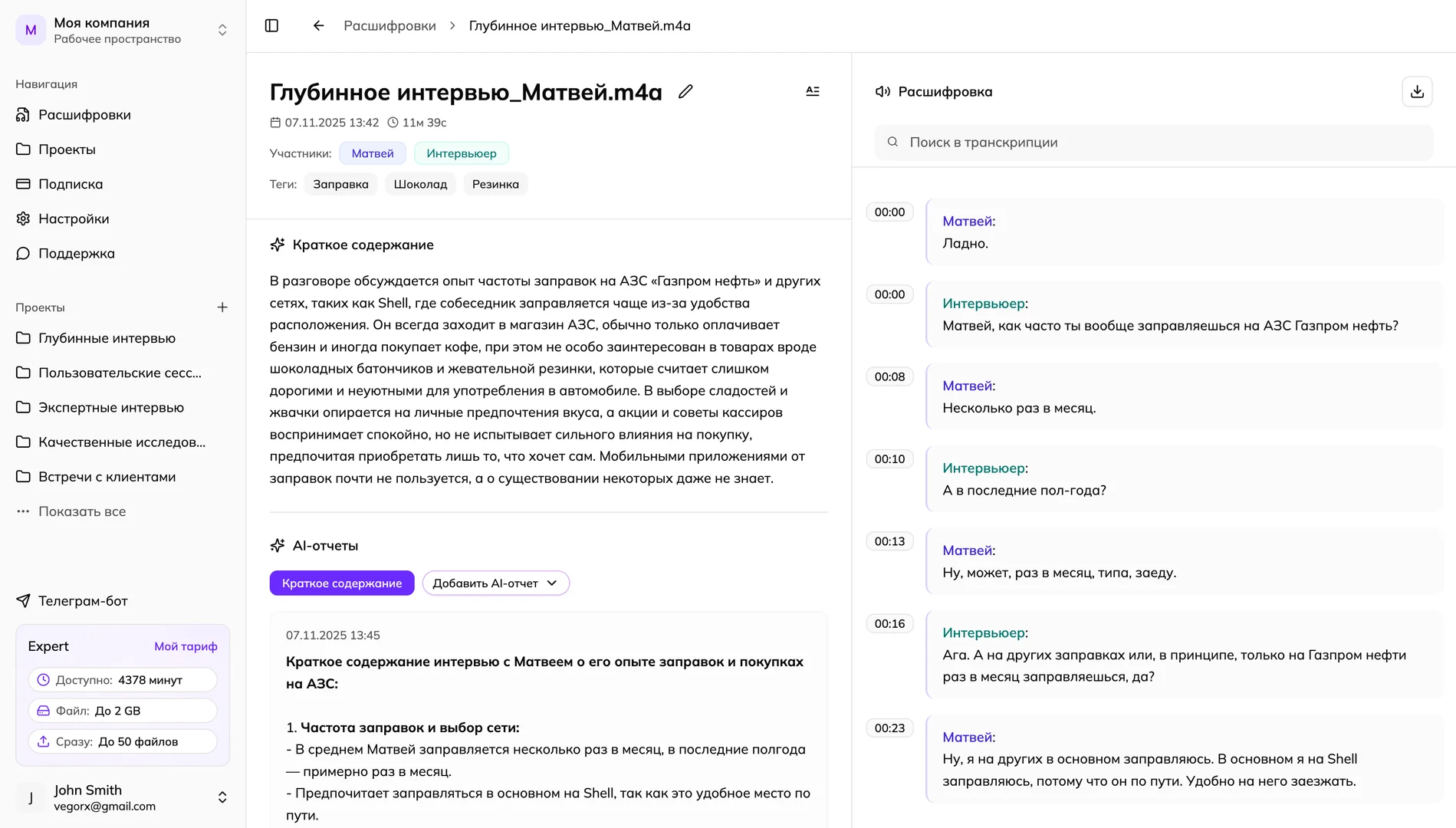
Memo AI meeting transcript with speaker labels, timestamps, and structured AI summary

200,000+ people and teams trust Memo AI

Why manual meeting notes break team follow-through

Four everyday bottlenecks that slow teams down after every call

  1. Agreements fade by Friday

    Without written context, teams re-debate calls from two weeks ago

  2. Post-call write-ups pile up

    Scrubbing a 60-minute recording to draft a recap eats half an afternoon

  3. Follow-up tasks drop off

    Action items buried in chat threads miss owners and deadlines

  4. Typing splits your attention

    Jotting notes live pulls you out of listening and asking sharp questions

AI Reports

Transcript, summary, and tasks from one call

Generate structured AI meeting notes, follow-up emails, and action items from one call

Follow-up email

Client-ready recap with outcomes, owners, and due dates ready to paste

Alder Studio · Q4 Launch Sync · Oct 14, 2026
Tonina@alderstudio.co, devon@alderstudio.co, marco@alderstudio.co
SubjectAlder Studio · Q4 Launch Sync · Oct 14, 2026

Hi everyone,

Here is the recap from today's Q4 launch sync at Alder Studio, including our confirmed dates and owners:

  • Closed beta for the new onboarding flow moves to October 22 after final QA
  • Approved the $4,500 budget for customer webinar promotion in November
  • Switched weekly rollout reviews to Tuesdays at 10:00 AM PT

Next steps

  • Nina to finalize the onboarding checklist with QA by October 17
  • Devon to publish updated USD pricing FAQ before beta invites go out
  • Marco to draft the webinar landing copy by Thursday afternoon
Copy email
Slack & Teams update

Compact channel brief showing what changed and who owns the next step

#q4-launch
MMemo AIjust now

Q4 Launch Sync (Oct 14): beta ships Oct 22, $4,500 webinar budget approved, weekly check-ins moved to Tuesdays.

Key decision

Beta launch date locked for October 22 with full QA sign-off

Copy update

Key decisions log

Every approved decision listed clearly with the reasoning behind it

Alder Studio · Q4 Launch Sync · Oct 14, 2026

3 decisions recorded

  • Launch closed beta for mobile onboarding on October 22

  • Allocate $4,500 toward November customer webinar promotion

  • Hold recurring rollout reviews every Tuesday at 10:00 AM PT

Action items list

Concrete tasks tagged with assignees and target dates for your tracker

Alder Studio · Q4 Launch Sync · Oct 14, 2026

4 action items · due Oct 18

  • Complete final QA checklist for onboarding

    nina.c
  • Update public USD pricing FAQ page

    devon.r
  • Draft November webinar landing copy

    marco.v
  • Send calendar invites for Tuesday reviews

    nina.c
Export tasksDue: Oct 18

Meeting summary

Structured meeting summary covering agenda topics, risks, and outcomes

Alder Studio · Q4 Launch Sync · Oct 14, 2026

Meeting summary

Q4 Launch Sync (Oct 14): beta ships Oct 22, $4,500 webinar budget approved, weekly check-ins moved to Tuesdays.

  • Closed beta for the new onboarding flow moves to October 22 after final QA
  • Approved the $4,500 budget for customer webinar promotion in November
  • Switched weekly rollout reviews to Tuesdays at 10:00 AM PT
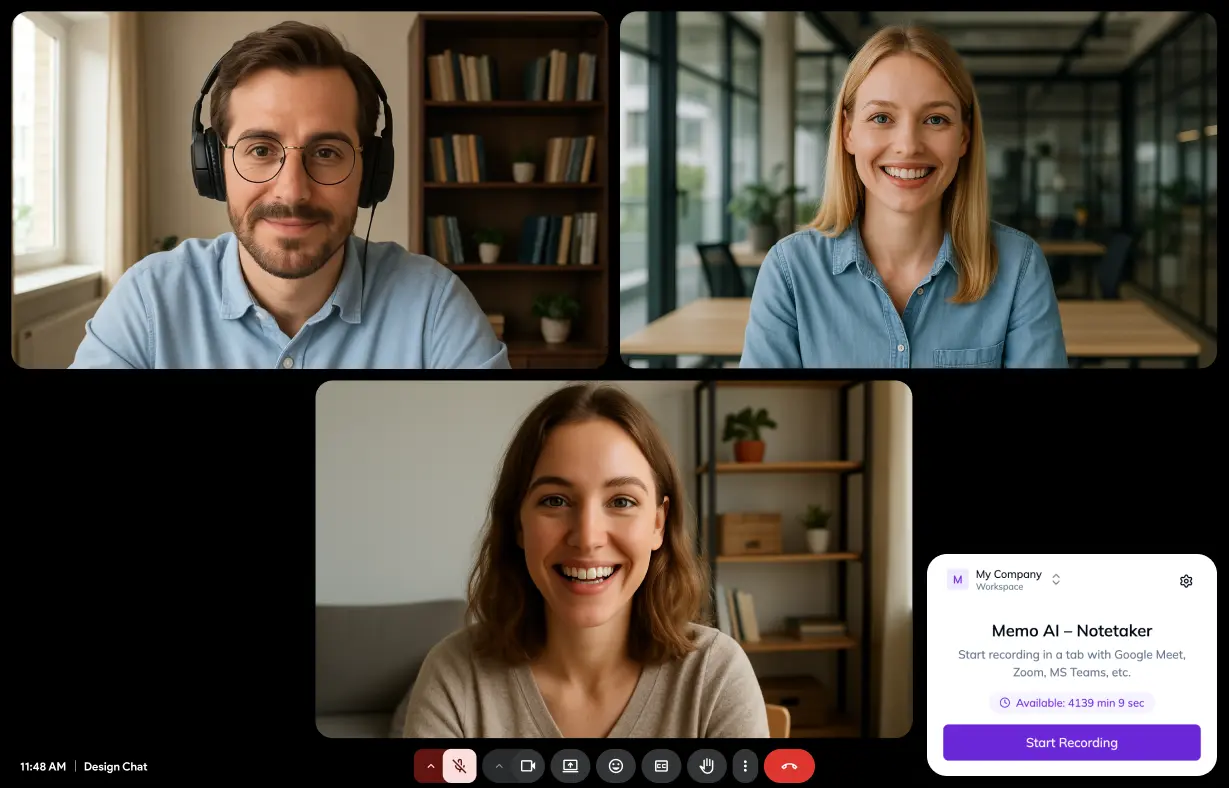
Record calls from Chrome or desktop — no meeting bots
Bot-Free Recording

Record calls from Chrome or desktop — no meeting bots

Use the Chrome extension or desktop AI note taking app as your bot-free meeting recorder on any call

  • Zoom
  • Google Meet
  • Microsoft Teams
  • Webex
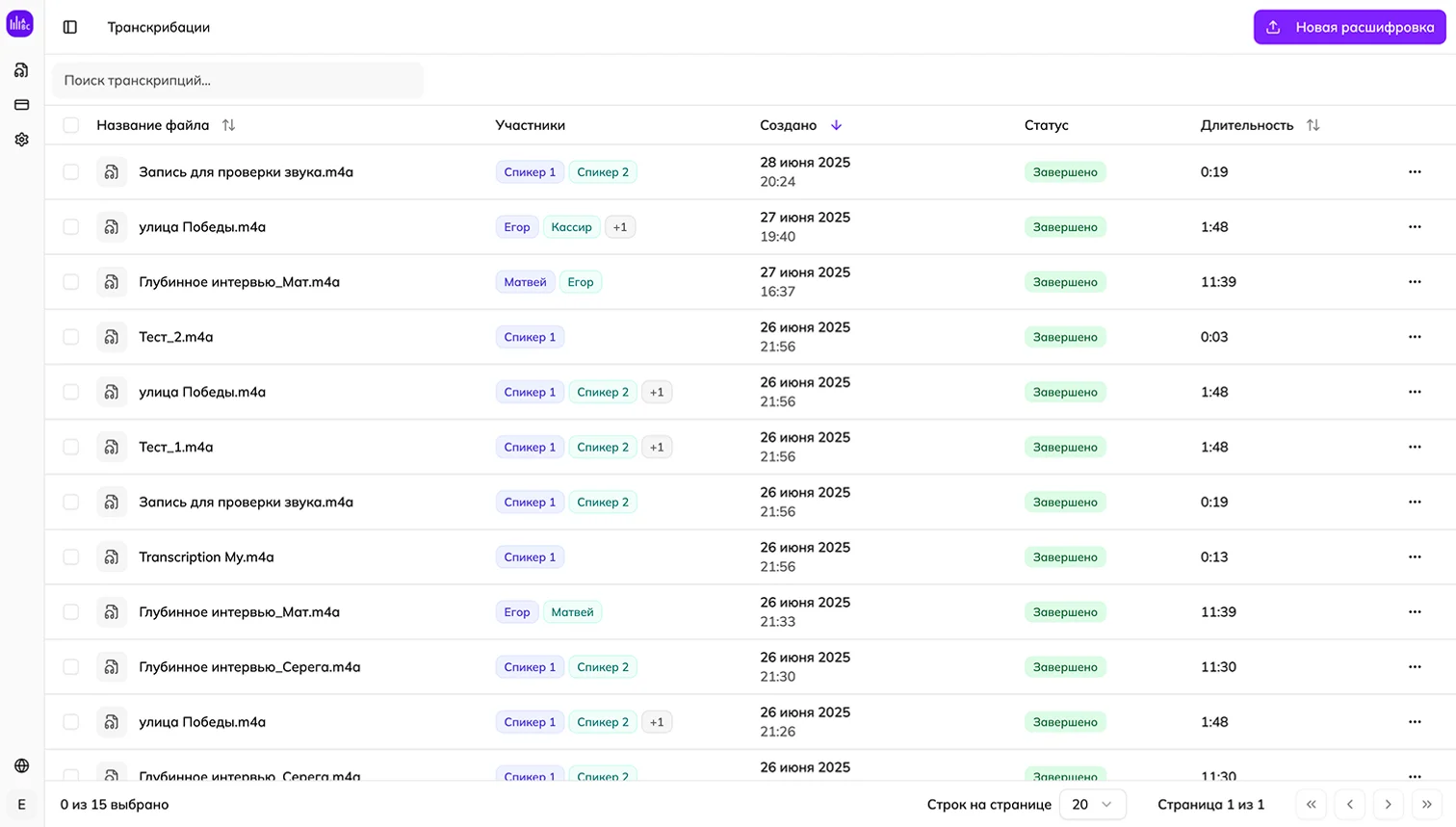
Memo AI recordings management interface
Searchable Archive

Find any quote or decision across past calls

Meeting notes software that keeps every transcript, AI report, and chat answer searchable in one workspace

  • Unified call library
  • Instant keyword & AI search
  • Full decision timeline
  • Faster team onboarding
Team workspaces

Shared meeting memory for your whole team

Group calls by client or project and control who can view or edit each transcript

Dedicated team workspaces

Keep product, sales, and client calls separated with role-based member access

Projects and share links

Organize transcripts into project folders and share public links in one click

Everything built for reliable meeting transcription

What your AI notetaker handles from speaker labels to clean export

Speaker labels

Separates voices with timestamps so every quote has a clear owner

  • NinaProduct Lead
  • DevonEngineering
  • MarcoGrowth

99 languages

Transcribe English, Spanish, German, French, Japanese, and 94 more — with optional translation on upload

Inline transcript editing

Rename speakers and polish phrasing directly in the web or desktop editor

Julia

Alex, our deadline is today!

Alex

Shipped the fix for the deadline checker before standup

Clean multi-format export

Download transcripts and AI reports as PDF, DOCX, Markdown, TXT, or SRT

How it works

From joining a call to sharing notes with your AI meeting note taker in three steps

  1. Join your call as usual

    Open Zoom, Google Meet, or Microsoft Teams — the desktop app spots active calls and prompts you

  2. Start bot-free recording in one click

    Click record in the Chrome extension or desktop app — capture stops automatically when the call ends

  3. Share transcript and AI notes

    Review speaker-labeled text, pick a report format, and copy or export in ~4 minutes per hour

Tailored reports for every role

Switch templates to match the way your team actually runs calls

  • Product ManagersProduct spec recap

    Product Managers

    Capture sprint reviews, roadmap tradeoffs, and engineering owners from every sync

  • Sales & Account TeamsDeal summary

    Sales & Account Teams

    Log buyer objections, budget signals, and follow-up emails right after discovery calls

  • Recruiting & HRCandidate scorecard

    Recruiting & HR

    Turn hiring interviews into structured candidate notes with direct quotes and timestamps

  • Marketing TeamsCampaign brief

    Marketing Teams

    Keep creative reviews, agency check-ins, and launch checklists aligned in shared folders

  • Consultants & AgenciesClient minutes

    Consultants & Agencies

    Deliver crisp client summaries and agreed milestones without bringing a bot into executive calls

0 bots joining your calls
Desktop app and Chrome extension capture audio locally with no extra guest
~4 min per 1-hour meeting
Full speaker-labeled transcript and ready AI meeting notes shortly after hang-up
99 languages supported
Automatic language detection plus optional translation when uploading recordings
Customer stories

Less note-taking, clearer follow-through

How teams, researchers, and founders turn calls and recordings into work that ships

200,000+
users worldwide
500,000+
hours of calls & audio processed
Our enterprise prospects used to ask us to kick recording bots out of Zoom. With Memo AI on macOS, the call stays natural and I paste the follow-up email two minutes after we hang up.
Claire BennettEnterprise Account Executive
Having decisions, action items, and speaker timestamps in one searchable library saved our distributed product team from endless 'who agreed to that?' Slack threads.
Omar Al-MansoorDirector of Product
We interview candidates in English, German, and Spanish. Memo AI keeps every speaker distinct and lets hiring managers scan structured summaries instead of replaying full calls.
Sophie LindholmHead of Talent
Clients hated seeing a recording bot sitting in our Zoom lobby. Memo AI captures calls quietly from my Mac, splits every speaker cleanly, and hands me a summary with owners and due dates before I join the next call.
Hannah BrooksHead of Operations, Northstar Freight
We run bilingual interviews in English, Spanish, and Portuguese. Uploading a two-hour video takes a few minutes, speaker labels hold up even when people interrupt each other, and AI chat pulls matching quotes across an entire study.
Lucas FerreiraLead UX Researcher, Brightline Health
Connecting Memo AI to Claude and Cursor over MCP changed our sprint prep. I can ask what a customer requested three weeks ago and jump straight to the exact minute in the transcript without digging through folders.
Priya NairStaff Product Manager, Kestrel Cloud
Confidentiality is a dealbreaker in advisory calls. Knowing the source audio is deleted from servers right after processing while my local copy stays on my laptop let our partners adopt it across the whole practice.
Owen GallagherManaging Partner, Alder Advisory
Every episode starts as a multi-gigabyte video file. Memo AI transcribes it in minutes, gives us timestamped show notes and SRT captions, and saves our editors half a day per release.
Sofia LindholmPodcast Producer, Nordic Audio Lab
FAQ

Frequently asked questions

How Memo AI records calls without bots, builds reports, and protects your data

What is Memo AI and how does the AI note taker work?
Memo AI is an AI note taker and AI meeting assistant that works as a note taker online in Chrome or as a desktop app on macOS and Windows, transcribes every speaker with timestamps, and generates structured summaries, follow-up emails, decisions, and action items.
Does Memo AI join Zoom, Google Meet, or Microsoft Teams as a bot?
No. Neither the desktop app nor the Chrome extension joins your call as a participant. The desktop app detects active calls on Zoom, Google Meet, or Microsoft Teams and prompts you to start recording with one click, then stops automatically when the call ends. Explore the bot-free desktop app for macOS and Windows
Is there a free AI note taker plan, and what does Pro include?
Yes. Memo AI includes a free AI note taker plan with 50 minutes per month and no credit card required. Paid USD plans via Stripe start at $6/mo billed annually ($8/mo monthly) for Lite, and Pro at $11/mo billed annually ($14/mo monthly) includes unlimited meeting recording and transcription from the desktop app and Chrome extension.
How does Memo AI protect confidential meeting audio and transcripts?
Source audio and video files are deleted from our servers immediately after transcription finishes. If you record with the desktop app, a local copy stays on your own computer for built-in playback. Transcripts and AI reports are stored encrypted (AES-256) and are visible only to you and teammates you explicitly invite.
What types of AI meeting notes and reports can Memo AI create?
From a single call you can generate a follow-up email, a short Slack or Teams update, a key decisions log, an action items list with owners, a full meeting summary, or your own custom report template — and switch templates anytime without re-uploading.
Which languages and export formats are supported?
Memo AI supports meeting transcription in 99 languages with automatic language detection, automatic speaker separation (with one-click speaker renaming), and optional translation on upload. You can copy reports directly or export transcripts and summaries to PDF, Word (DOCX), Markdown, TXT, or SRT subtitles.
Can teams search past meetings and collaborate in shared workspaces?
Yes. Shared workspaces let teams organize calls into project folders, manage member permissions, share public links, and search past meetings via keyword search, built-in AI chat, or MCP in ChatGPT, Claude, and Cursor.
Start with 50 free minutes

Ready for bot-free meeting notes?

Try a free AI note taker with 50 minutes every month — upgrade to Pro for unlimited meeting recording

50 free minutes every month | Unlimited meetings on Pro | No credit card required